
Welcome to Printspot
First of all, we want to thank you for using Printspot and trusting us.
In the help center of our website, you have a collection of articles dedicated to resolving your doubts or guiding you step-by-step to get the most out of your Printspot solution.
With your registration on our platform, you should have received access to three services of our solution: Printspot, the Template Manager or Services, and Print Center.
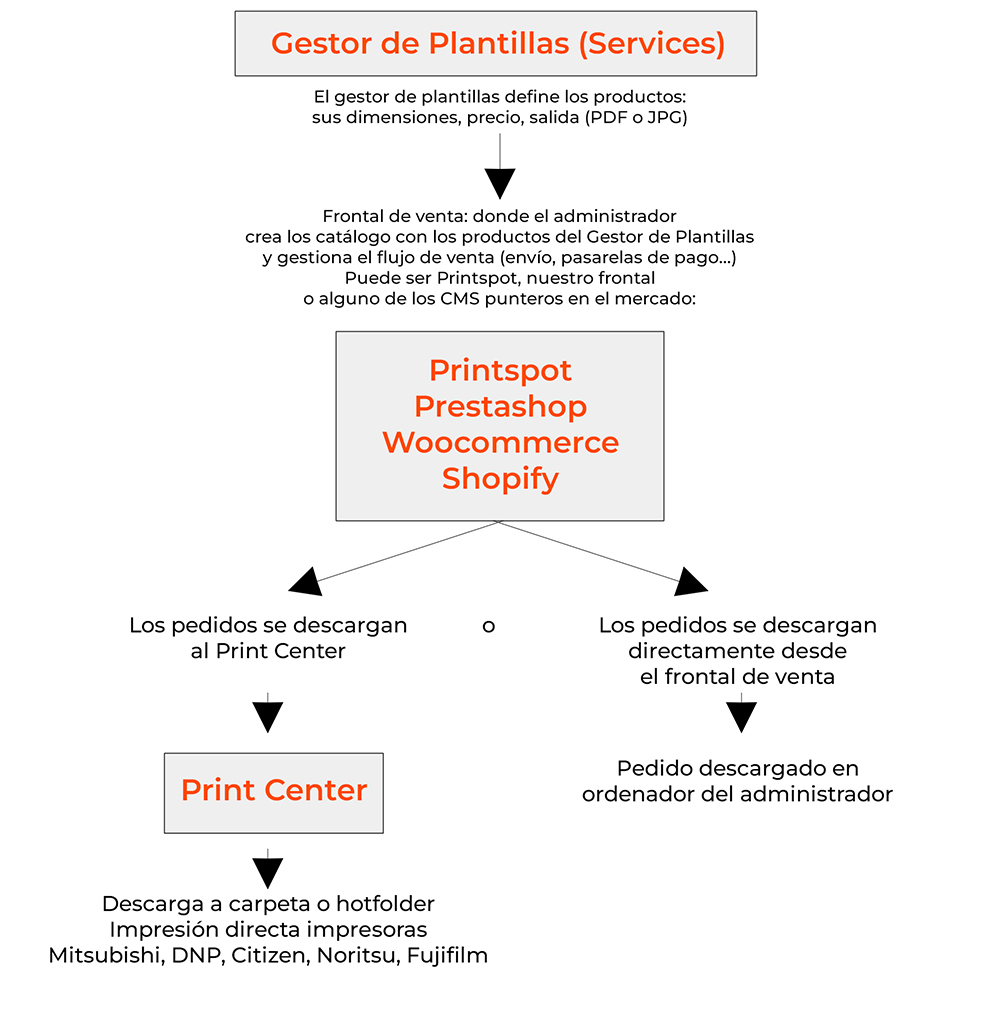
Below, we provide a brief explanation of what each one consists of:
What is Printspot?
Printspot is the sales storefront; it is a complete eCommerce platform with the possibility of integration with other websites. It is your digital showcase to customers. Ultimately, it is where your customers will make their purchases, where you will configure store-specific elements, such as shipping cost rates, payment methods, etc.
What is the Template Manager or Services?
Services is the application for managing and creating templates. In it, you can create or manage templates with personalized designs using an HTML editor compatible with any type of device with an internet connection. A template is the entity that defines a product, the dimensions a photo should have, the paper finish, the dimensions of a canvas, the printable area of a mug…. If you want more information on how it works, click here.
What is Print Center?
It is the tool that allows you to manage the download and printing workflow of your orders. The software will communicate with your sales storefront to download all placed orders and will allow you to choose between saving the files on your computer or sending them to be printed automatically on the configured printer.
How to get started?
In the automated store registration process, we have collected information such as the store name, language, and other basic data, but other types of information are necessary depending on the sales workflow you want for your platform:
- Do you want to offer your customers home delivery for orders, in-store pickup, or both methods?
Printspot allows itself to be configured to let the user select where to receive or pick up their orders. The basic subscription includes one pickup point, but as many as desired can be included (store chain model) - Which payment platform do you want to include in Printspot?
You have all these options to decide. - How do you want to download the orders?
With our solution, you have two different ways to download orders; you must choose the one that best suits your needs:- You can use the Print Center, which is the order download software. The advantages of the Print Center are that it includes workflows per order, direct printing to printers of the main brands on the market, and output to a hotfolder. If you want more information, consult this link. If you want to see what the download circuit with Print Center is, click here.
- If you do not need such a complete solution and simply wish to be able to download orders without any additional software, we can configure Printspot so that you download orders directly from the administration panel and with a simple click, it will be downloaded:
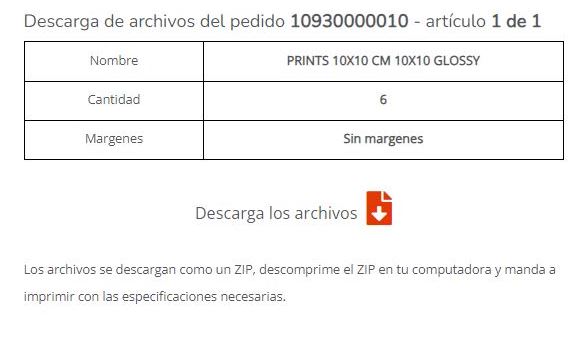
If you want to see what the download circuit is from the Printspot orders panel, click here.
Once you are clear about your sales workflow based on the answers to these questions, we can finish configuring the store to your needs.