
Stock Control in Shared Catalogs
En el site de origen de un catálogo compartido (como un site central, por ejemplo) salen dos opciones: Habilitar control de stock y Aplicar control de stock entre catálogos
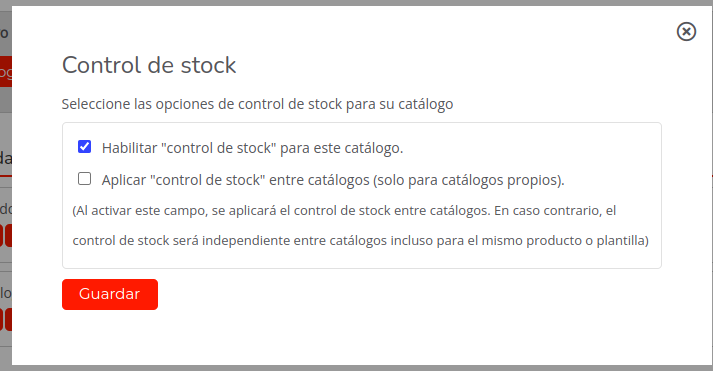
The first option activates the stock control functionality. The second option allows local stores with the shared catalog (i.e., the other sites that will take information from this shared catalog) to share or be affected by the stock of the “central” catalog.
In the destination site of a shared catalog, two other options appear:
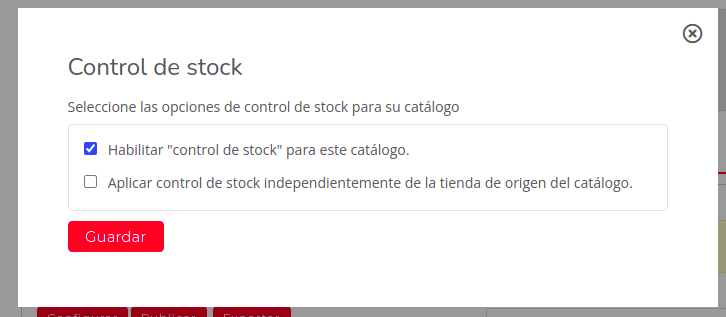
The first option, as in the previous case, activates the stock control functionality in the specific catalog. The second option allows local stores that have the shared catalog to override the stock control, meaning instead of paying attention to the stock control of the “central” catalog, they will switch to paying attention to their own catalog’s stock control (the stock control of the local destination site catalog is unlinked from the shared catalog of the origin site).
For a destination site to work with local stock control, all 4 checks (2 from the “central” catalog and 2 from the destination catalog) must be active. For a destination site to work with centralized stock control, 3 checks (2 from the “central” catalog and 1 from the destination catalog) must be active.
Product stock menu for a specific product:
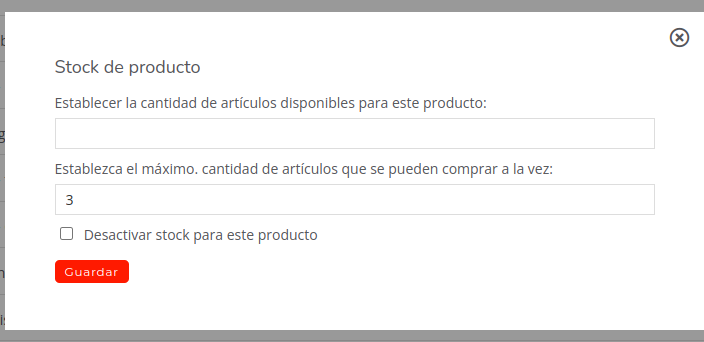
The first option defines the available stock units of that product. If you only have 2 units in stock and they try to buy 2 in the cart, a warning window appears stating that the purchase cannot proceed because only 2 units are available in stock.
The second option defines the maximum quantity of items that can be purchased at once. IMPORTANT! This does not work if the product has no stock, as it is checked before use whether the stock is activated for the product (in the case of the image above, for example, it will not work).
The third and final option deactivates stock control for that specific product.
IMPORTANT! It must also be taken into account that when modifying a product from a shared catalog (price, name…) communication with the central catalog is cut off, so if the product is modified, it de facto unlinks the product from the stock of the “central” catalog.
It will request information from the “central” catalog:

I modify the product name, cutting communication with central:
